![256.png]](https://suporte.logcomex.com/hs-fs/hubfs/256.png?width=40&height=40&name=256.png)
Unlike the standard Excel export (which provides raw data), the Strategic Report is a PDF file formatted with charts and market analyses ready for presentation.
How to generate the report:
-
Perform your search in NCM Intel and wait for the charts to load on the screen.
-
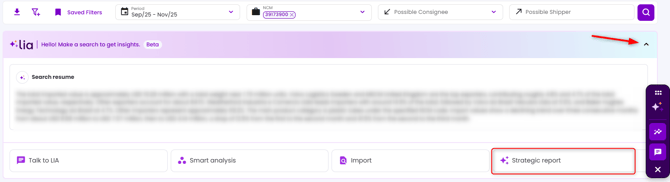
At the top of the screen, locate the LIA insights banner.
- Click the small arrow (▼) to expand or to collapse the insights banner.
- Select the Strategic Report option.
-
Confirm the request in the modal that appears.
- Attention: It's not possible to export the Strategic Report via main button (excel and dashboard PDF).
Where do I receive the file? The report is not available to download on the platform (Customer Center).
-
Due to the complexity of the charts, the system processes the information and sends an access link to your registered email.
-
Wait time: Processing may take a few minutes depending on the volume of data in your search. The button will turn "gray" during this period.
-
Upon receiving the email, click the link to view, download as PDF, or share.
Common issues:
-
"The Strategic Report option does not appear": If the option is not listed when clicking the arrow, clear your browser cache (CTRL + SHIFT + R) and try again.
-
"The button is stuck/gray": This indicates that a request is already being processed. Wait for the email before requesting again.
