![256.png]](https://suporte.logcomex.com/hs-fs/hubfs/256.png?width=40&height=40&name=256.png)
If you forgot your password or need to change it for security, follow the automatic procedure on the login screen.
Step by Step:
-
Access the platform's login page.
-
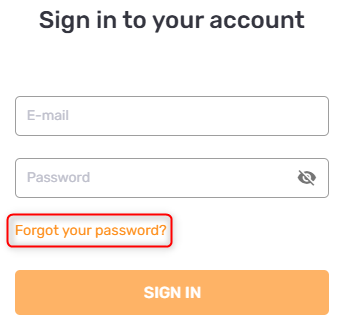
Click the "Forgot your password?" link right below the login button.
-
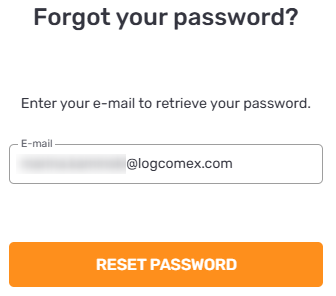
Enter your registered user email and click Reset password.
-
A confirmation message will appear in the bottom left corner of the screen.
Check your email: The system will send a reset link immediately.
-
Sender:
noreply@logcomex.com -
Subject:
Logcomex - Recuperação de Senha

Common Issues (I didn't receive the email):
-
Check your Spam or Trash folder.
-
Confirm you typed the email correctly (no extra spaces).
-
If you use a corporate email, your company's firewall might have blocked the
noreplysender.
Still having trouble? Contact Support Send an email to the address provided in the platform's login area, as shown in the image below.
-
Tip: To expedite the process, include your e-mail and company name in the e-mail.
